Fake Business Emails and Invoice Scams: How to Protect Your SME
A supplier email with new bank details may not be genuine. Learn how business email scams work, the warning signs to watch for, and a simple verification process that protects your payments.
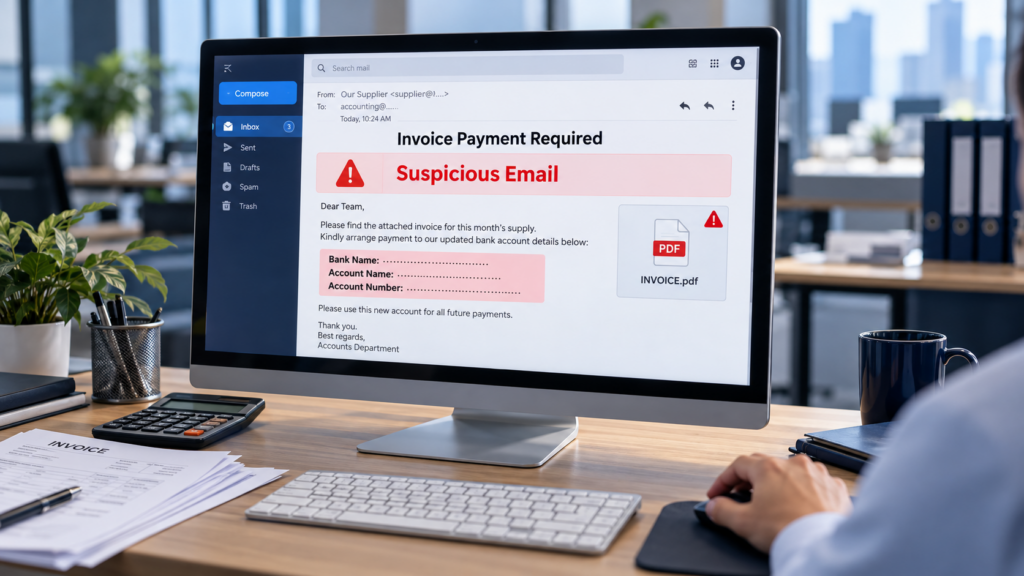
An email arrives from your regular supplier with an updated invoice. The company logo looks correct, the amount matches your purchase, and the message includes your previous conversation.
There is just one change: a new bank account.
Before your accounts team makes the transfer, how do you know the request is genuine?
Fake business emails and invoice scams exploit familiar relationships and routine payment processes. For SMEs in Malaysia, a simple verification procedure can help prevent a costly mistake.
What Is a Business Email Scam?
Business Email Compromise (BEC) is a type of fraud in which criminals impersonate a trusted person or organisation to request money or sensitive information.
They may pretend to be your director, supplier, customer or colleague.
Some use a misleading sender name or a lookalike email address. Others gain access to a genuine mailbox and send messages from the real account. This means even a familiar email address is not proof that a payment request is legitimate.
Common Scams Your Employees Should Recognise
Supplier Bank Account Changes
A message claims that a supplier has changed banks and asks you to pay an outstanding invoice into a new account.
The invoice may contain accurate details copied from a genuine document. Its appearance alone cannot confirm that the payment instructions are safe.
Urgent Instructions from the Boss
Someone posing as a director asks an employee to make an immediate transfer. They may claim to be in a meeting and insist that the request remain confidential.
Pressure to bypass normal approval is a reason to pause and verify.
Fake Email Login Requests
A message says your mailbox is full, your password is expiring or your account will be suspended.
The link leads to a fake login page designed to steal your credentials. Attackers can then use the account to impersonate you or monitor business conversations.
Warning Signs to Watch For
Be cautious when a message includes:
- New bank details or an unexpected change in payment instructions.
- Pressure to act immediately or keep the request secret.
- A sender address with small spelling differences.
- A reply address that differs from the sender address.
- An unexpected attachment, login link or MFA approval request.
- Instructions to avoid calling the usual contact.
Good grammar, a professional signature and a familiar conversation thread do not guarantee authenticity.
How to Prevent Invoice and Email Scams
Verify Payment Changes Independently
Before changing a supplier’s bank details, call an authorised contact using a number already held in your company records.
Do not rely on the phone number provided in the suspicious email or invoice.
Replying to the same email is not independent verification if an attacker controls the mailbox.
Require a Second Approval
Introduce a second approval for bank detail changes and payments above an agreed threshold.
Record who verified the change, how it was confirmed and who approved it. Apply the procedure even when a request appears to come from the boss.
Secure Company Email Accounts
Use unique passwords and enable multi-factor authentication (MFA). Prefer phishing-resistant options, such as passkeys or security keys, where supported.
Employees should never share verification codes or approve sign-in requests they did not initiate.
Configure Email Authentication
Ask your IT provider to review SPF, DKIM and DMARC for your company domain.
These controls help receiving mail systems identify unauthorised use of your domain. They do not stop every scam: criminals can still use lookalike domains or compromised genuine accounts.
Make Suspicious Emails Easy to Report
Give employees a clear contact for reporting unusual messages. Encourage them to check before making a payment or entering a password.
A short verification call should be treated as part of normal business practice.
What If You Have Already Made a Payment?
Contact your bank’s fraud team immediately through an official channel. Explain that the transfer may be fraudulent and ask whether it can be recalled or stopped. Recovery is not guaranteed, so act quickly.
Preserve the original emails, attachments, payment records and relevant messages. Notify management and your IT provider, and report the incident to the police.
If an email account may be compromised, your IT team should investigate access, revoke suspicious sessions and review forwarding rules and account settings. Changing the password alone may not complete the response.
Protect Your Business Before the Next Payment
Email security and payment procedures work together. Technical controls reduce risk, while independent verification helps employees catch requests that still reach the inbox.
Contact MY IT PLT to discuss business email security, account protection and practical IT support for your company.
By the MY IT PLT team